How to create a community on Ecency?

Creating your own community or group on Ecency will give you full control over community account, which means nobody even Ecency cannot take that away from you. In this article, learn how to create communities on decentralized, blockchain based and web3.0 powered networks.
When you create a community on Ecency, you hold the keys to your community while creating, you set the rules on which content gets published on community, you choose the moderators and have completely control in decentralized and blockchain based community.
Are you community builder or have following? Then you found your best home on internet and on blockchain world. Create community and invite your friends and followers, reward them, engage with them with true ownership. You will be giving your followers lifetime of benefits, where they can feel at home and know they have full control over their account, content and can never be silenced/shadow-banned. True freedom of speech.
To begin creating your community on Ecency
1. Go to Communities on top navigation bar
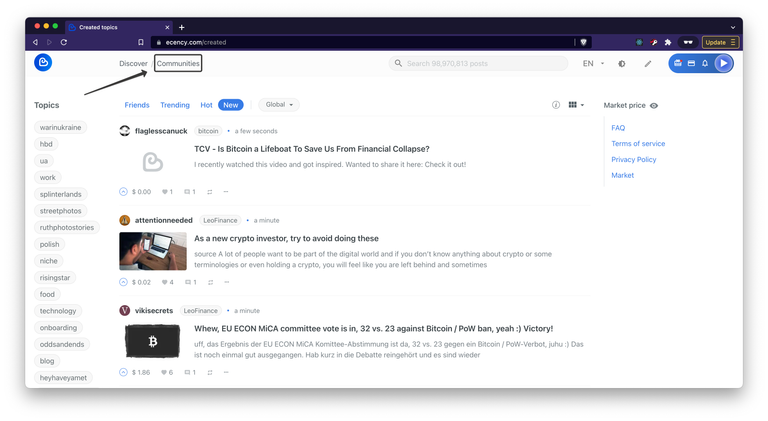
2. Click on Create community
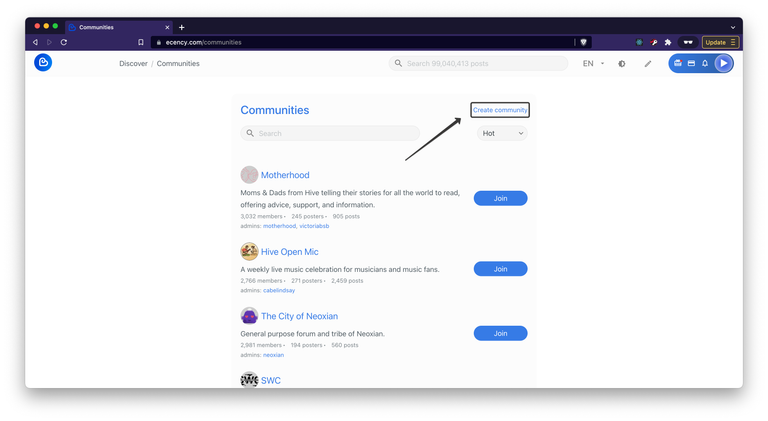
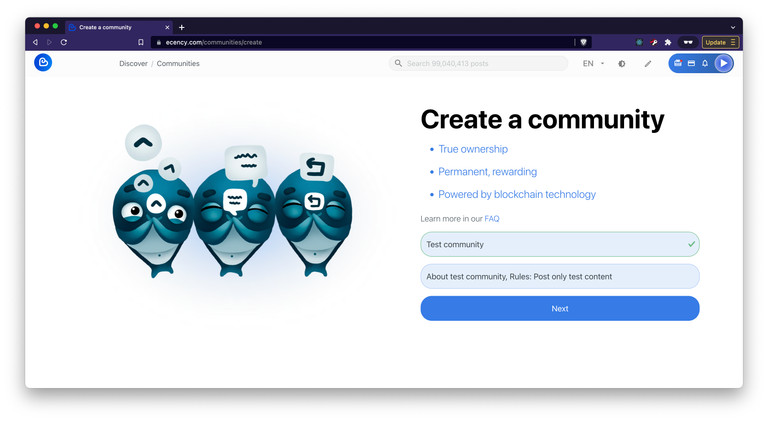
On this next screen you will have to fill in your new community Name or Title and About, you can include rules of your new community in About field as well. Then click "Next".
3. Get Community credentials
You will be given Community username and password which you are asked to store securely. Community credentials are very important to store securely, because it is your key to that community and account. If in future you want to modify community details, change or add admins, move ownership, etc. you will need this credentials.
Communities are created and registered on decentralized blockchain Hive. Accounts including community accounts can never be deleted, right now, it cost 3 HIVE (around $2.4 at the time of writing). Please make sure, Creator account has 3 HIVE in their balance before proceeding with creation.
Your Community username and password are auto generated, no one but you have knowledge about them, even Ecency doesn't know or keep this information anywhere. Copy and securely store your Community password.
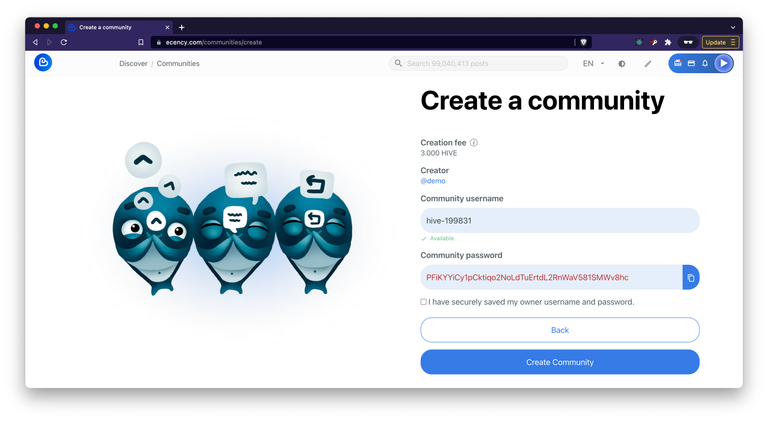
4. Finalize community creation
Once you have filled and stored necessary information securely, click on Create Community button to finalize community creation. After few seconds, you will be redirected to your community page with you (creator) being an admin. You can further configure your community by setting Avatar, Cover images for community, modify description, add moderators, etc.
You can share community link and invite friends to join/subscribe to your community and start publishing content within your community. Engage with people who post and make sure rules are followed and moderators are trustworthy.
We recommend you to create first post about Community, what it stands for, motivations, discussions types, rules, include social links, moderators guide and users guide and Pin that post to Community. So every new comers can learn more and start engaging.
That's it! You have successfully created and setup new community on decentralized web3.0 with Ecency.
Learn more: https://ecency.com/faq
Yas💯✨
Thank you for this. I'll put this into consideration for future purpose.
https://twitter.com/metodologiaecs/status/1504023223729545217
The rewards earned on this comment will go directly to the person sharing the post on Twitter as long as they are registered with @poshtoken. Sign up at https://hiveposh.com.
good
Thank you for the information how to make community, since now i been using ecency not only it was easy to use it'd a points to promote your post. Amazing ecency! keep it up!
thats such a cool content i always wondered how it works:) maybe some day i create my own community here lets see.. thx for the explanation!
...and dont forget to backup your new shiny house' keys!
😜
Nice and useful tutorial! 🔥🔥
Was the community creation price lowered recently? I seem to remember it being much higher. Glad to see a decentralized community building platform!
This is a good information. Thank you for sharing this with us.
Creating it is simple, it is difficult to give value to the community and have support in it if you do not have enough power to give an acceptable healing to the community participants.
I am so excited to say that I have already created my own community!
It will be about personal development through bringing alternative knowledge and financial awareness to people, making them understand and unleash the opportunities they surely have.
Here is the link to it!
https://ecency.com/created/hive-113359
Thanks for sharing your knowledge with us. Creating a community on Ecency shouldn't be a problem any longer🤗
Quiero integrarme a la comunidad
How can I change the community name? My community now doesn't show its name, but its username "@hive-number", although I did the same as advised from this post. The help chat is not currently working too 😰
Could you please write us your community account so we can check blockchain explorer?
Thanks, the community username is @hive-136316. I can’t see its name like the photo attached.
When community account is created usually some extra actions are performed to mark it as community account. Now it is not fully community account yet.
You have password for @hive-136316 account, right?
Please sign these 2 transactions one after another, this will make community properly registered and then you can modify name and descriptions.
https://hivesigner.com/sign/op/WyJjdXN0b21fanNvbiIseyJyZXF1aXJlZF9hdXRocyI6W10sInJlcXVpcmVkX3Bvc3RpbmdfYXV0aHMiOlsiX19zaWduZXIiXSwiaWQiOiJjb21tdW5pdHkiLCJqc29uIjoiW1wic2V0Um9sZVwiLHtcImNvbW11bml0eVwiOlwiaGl2ZS0xMzYzMTZcIixcImFjY291bnRcIjpcImNvY290aGVjaG9ua1wiLFwicm9sZVwiOlwiYWRtaW5cIn1dIn1d
after you sign first one, you can then sign this one with same @hive-136316 account.
https://hivesigner.com/sign/op/WyJjdXN0b21fanNvbiIseyJyZXF1aXJlZF9hdXRocyI6W10sInJlcXVpcmVkX3Bvc3RpbmdfYXV0aHMiOlsiX19zaWduZXIiXSwiaWQiOiJjb21tdW5pdHkiLCJqc29uIjoiW1widXBkYXRlUHJvcHNcIix7XCJjb21tdW5pdHlcIjpcImhpdmUtMTM2MzE2XCIsXCJwcm9wc1wiOntcInRpdGxlXCI6XCJUZXN0IGNvbW11bml0eVwiLFwiYWJvdXRcIjpcIlRoaXMgaXMgdGVzdFwiLFwibGFuZ1wiOlwiZW5cIixcImRlc2NyaXB0aW9uXCI6XCJcIixcImZsYWdfdGV4dFwiOlwiXCIsXCJpc19uc2Z3XCI6ZmFsc2V9fV0ifV0.
Thanks, I don't have the password for @hive-136316, so I have created another new community (@hive-186485) and sign in the two given links. But still, the page doesn't look like other normal communities. Is there anything I need to set on the Hivesigner page?
No above links were specific for hive-136316 account.
How did you create hive-186485?
with hive-186485, try these 2 links:
https://hivesigner.com/sign/op/WyJjdXN0b21fanNvbiIseyJyZXF1aXJlZF9hdXRocyI6W10sInJlcXVpcmVkX3Bvc3RpbmdfYXV0aHMiOlsiX19zaWduZXIiXSwiaWQiOiJjb21tdW5pdHkiLCJqc29uIjoiW1wic2V0Um9sZVwiLHtcImNvbW11bml0eVwiOlwiaGl2ZS0xODY0ODVcIixcImFjY291bnRcIjpcImNvY290aGVjaG9ua1wiLFwicm9sZVwiOlwiYWRtaW5cIn1dIn1d
and
https://hivesigner.com/sign/op/WyJjdXN0b21fanNvbiIseyJyZXF1aXJlZF9hdXRocyI6W10sInJlcXVpcmVkX3Bvc3RpbmdfYXV0aHMiOlsiX19zaWduZXIiXSwiaWQiOiJjb21tdW5pdHkiLCJqc29uIjoiW1widXBkYXRlUHJvcHNcIix7XCJjb21tdW5pdHlcIjpcImhpdmUtMTg2NDg1XCIsXCJwcm9wc1wiOntcInRpdGxlXCI6XCJUZXN0IGNvbW11bml0eVwiLFwiYWJvdXRcIjpcIlRoaXMgaXMgdGVzdFwiLFwibGFuZ1wiOlwiZW5cIixcImRlc2NyaXB0aW9uXCI6XCJcIixcImZsYWdfdGV4dFwiOlwiXCIsXCJpc19uc2Z3XCI6ZmFsc2V9fV0ifV0.
We will fix these bugs, looks like community creation page has one bug...
All look great now! Thank you so much!! Let me confirm just one thing, so creating a community shouldn't need to go through the two links, right? That's the bug? Or is it normal to register manually in the links by the community creator?
Yes, it is new bug. We recently made some changes, someone tripped on cable I guess :)
We will fix it asap, thanks for your patience. Always backup your password for community account because without it, in future you cannot modify community.
Thanks for prompt help, but it seems not possible to edit in the setting page 😭 I can’t type in or remove here. Could you please check if this is also bug?
This is our previous older version of website: https://v3.ecency.com
Please try editing there, if it works let me know so we can fix main website asap along with other bug you discovered. Thank you!